Wedding guest list and RSVP apps for Indian weddings, compared: free, WhatsApp and per function (2026)
Wedding guest list and RSVP apps for Indian weddings compared: what each keeps (names, functions, replies), WhatsApp, Excel export, price and the free ways.

For a small wedding, a shared Google Sheet for the list and a Google Form for replies is enough. For hundreds of guests and five functions, use a tool that keeps the list and the replies together and counts each function: The Curated Knot or Mangalyam (free), Wedence (named replies from ₹3,999), Joy or Zola for guests in the US, or, with an Invifest invitation, its RSVP console and Aangan (ours).
On this page
- What a guest list app should keep
- The free ways: a sheet, a Google Form and WhatsApp
- Guest list and RSVP apps compared (checked 27 October 2026)
- Which ones send on WhatsApp, and from whose number
- Can the whole family work on one list?
- Where the replies should go
- What happens to the list after the wedding
- Which one should you choose?
- Designs
- Questions
Most families start with the guest list in three places: a diary, a parent's phone and a spreadsheet someone began and never finished. One family this season had 300 to 400 guests spread across paper notes and several spreadsheets. The next question is always the same: which app should hold the one list, and collect the replies, function by function?
Here is what each kind of tool keeps, from a free sheet and WhatsApp's own events to the RSVP apps and wedding websites families use in India, checked on their own pages on 27 October 2026. We make Invifest and its guest dashboard, Aangan, so weigh our view with that in mind. Both are in the comparison like everyone else, marked as ours.
What a guest list app should keep
Before you compare apps, decide what the list has to hold. For an Indian wedding that is:
- Who: the name as you will greet them, and a phone number with its country code.
- Which functions: a tick for each function the guest is invited to.
- Their reply, for each function: coming or not, and how many.
- The extras that matter: the side, who is inviting them, whether they need a stay, and their arrival date.
- An export to Excel, for the caterer, the hotel and whoever books the cars.
Our guest list guide has a header row with these columns, ready to paste into Excel or Google Sheets. Clean it before you import it anywhere: in one family's import, a single inconsistent column created a stray group of 199 guests.
The free ways: a sheet, a Google Form and WhatsApp
Many families never need an app. A shared Google Sheet holds the list, and a Google Form sent with the invitation collects the replies, with a question for each function. Google's help pages say you can view all the responses in a spreadsheet or download them as a CSV file.
WhatsApp has two tools of its own. A poll in a group asks one question with up to 12 options. An event, created in a chat or a group, lets people reply Going, Maybe or Not going, and can allow each guest to bring one more. WhatsApp's help centre is clear about the limits: you cannot invite anyone who is not already in that chat, an event cannot be forwarded to another chat, it has one host, and people who join the group later do not see events made before they joined.
What free leaves to you: copying every reply into the sheet, matching "Pinky" in the form to "Priyanka Sharma" on the list, chasing everyone who has not answered, and making sure the reception-only guests never see a form that lists the haldi.
Guest list and RSVP apps compared (checked 27 October 2026)
| Tool | The guest list | Functions per guest | Replies for each function | Export | Price | |
|---|---|---|---|---|---|---|
| Google Sheet and Form | A sheet you build | A column you add | If the form asks for each | Sheet or CSV | Paste the form's link yourself | Free with a Google account |
| WhatsApp events and polls | Only the members of each group | One event per function, in each group | Going, Maybe or Not going, per event | None | Inside WhatsApp | Free |
| The Curated Knot | Yes, with groups; CSV import | A form for each event, each with its own guest list | Yes | CSV | Copy the RSVP link into chats; sending from the dashboard "coming soon" | Free; paid plans "coming soon" |
| Mangalyam | Yes, by side and family, with plus-ones; CSV import | Yes, ticked for each guest | Yes, with a headcount for each function | CSV | Paste each guest's personal link | Free for couples |
| Wedence | Yes; paste from a spreadsheet | Event-wise invitations on Signature | Yes on Free; named replies from Pro | Excel, from Pro | Sending, reminders and read tracking on Pro, up to 500 guests | Free; Pro ₹3,999; Signature ₹7,999, one-time |
| Weddingkart | Yes, imported from a sheet | Each ceremony with its own guest list, by its multi-event page | Its own pages disagree | Excel | Sends for you, from its number or yours, with reply buttons | From ₹7,079 with GST, per wedding |
| GetMyInvite | Built from the replies | Not described | Yes, a tick box for each | CSV | Share the link yourself | Free |
| WeddingWire India | Yes, with groups and menu choices | Not described | One RSVP | Not described | Share the link yourself | Free |
| Joy | Yes, with tags; CSV import | Yes, by tag or by guest | Yes | CSV | Paste the link yourself; texts to US and Canadian numbers only | Free |
| Zola | Yes; spreadsheet or Google Sheet import | Yes, ticked for each guest | Yes | CSV or Excel | Not mentioned; texts to US numbers only | Free |
| Invifest RSVP console (ours) | No: the replies only | Not in the console | Each reply lists the functions the guest ticked | Excel | Replies come in from the invitation link | Free with an Invifest invitation that has a reply form |
| Aangan (ours) | Yes: upload Excel or paste names; a sheet view | Yes, for each guest or group | Yes, with a headcount for each function | Excel | From your own WhatsApp, a tap per guest | An add-on to an Invifest invitation (prices) |
Read any "best app" list with care, this one included: most are written by one of the apps. Each fact above is from that tool's own pages, and prices and plans change, so check before you sign up.
Which ones send on WhatsApp, and from whose number
This is where the tools differ most, and where families are most often surprised.
- You paste the link yourself. Google Forms, The Curated Knot (its own sending is "coming soon"), Mangalyam, GetMyInvite, WeddingWire India, Joy and Zola. It costs nothing, but 300 guests means 300 chats.
- The app sends for you. Weddingkart sends from its own shared number, named "Wedding Invite", or from yours if you have a registered business number; its messages carry reply buttons, and it tracks each one as sent, delivered, read or failed. Wedence's Pro plan sends invitations for up to 500 guests, with scheduled sends, automatic reminders and read tracking.
- You send from your own WhatsApp, and the app keeps score. Aangan, ours, opens your WhatsApp with each guest's message and personal link ready, one tap a guest, and shows who has opened their invitation and who has not replied. Reminders go the same way, sent by you. Aangan does not send on its own and cannot see WhatsApp's read ticks: "opened" means the guest opened the invitation link.
A message from a business number arrives from a company; one from your own number arrives from family. Which matters more depends on your guests. Our guide to sending invitations on WhatsApp covers both, without getting your number blocked.
Can the whole family work on one list?
Usually the list is shared between parents, siblings and whoever runs the other side. A Google Sheet or Form can be shared with collaborators. Joy includes several editor accounts on its free plan, Weddingkart allows several team members, and Wedence's Signature plan puts both families on one plan; The Curated Knot lists collaborative planning as "coming soon".
Aangan opens in the browser on any phone or computer, so the whole family can use it, each sending to their own guests from their own WhatsApp. Guests install nothing with any of these tools: they reply in the phone's browser, or inside WhatsApp itself on Weddingkart and WhatsApp's own events.
Where the replies should go
Not into an email inbox, one message per guest. A bride on one of our calls expected exactly that, and was relieved to find a dashboard instead. Every Invifest invitation with a reply form comes with a private RSVP console: your own login, every reply with all its answers, including the functions ticked, search, a filter for who is coming, and an Excel download whenever you need a fresh count.
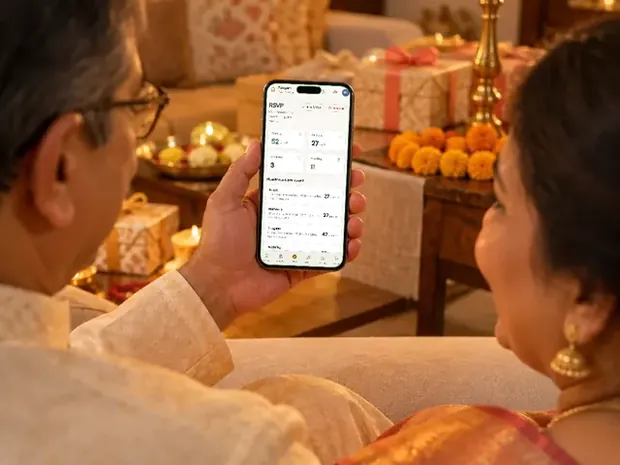
Aangan adds the guest list itself: you upload your Excel sheet or paste names, tick the functions each guest is invited to, and each guest gets a personal link that greets them by name and shows only their functions. It shows the headcount for each function the moment a reply comes in, who has opened the invitation and how often, and a follow-up list of guests who have not replied. You can open a sample of Aangan before you decide.
What happens to the list after the wedding
- Aangan stays open until 30 days after your last function, with an Excel export any time, and then deletes everything, sooner if you ask. The RSVP console keeps replies as long as your invitation is online.
- The Curated Knot keeps the website live for at least six months after the wedding date, then archives it; you can download your content first.
- Weddingkart keeps wedding data for 12 months after the wedding.
- Zola says your website never expires while you keep it visible; WedSites takes it offline when its hosting period ends.
- A Google Sheet stays in your own account.
Export the list before any tool closes it. It is the record of who came, and the start of the list for the next wedding in the family.
Which one should you choose?
| If you | Use |
|---|---|
| Have under 100 guests and one or two functions | A Google Sheet and a Google Form, or WhatsApp events in a family group |
| Want a free website that counts replies for each function | The Curated Knot, Mangalyam or GetMyInvite |
| Want WhatsApp invitations and reminders sent for you | Weddingkart, or Wedence Pro |
| Have most guests in the US | Joy or Zola, and read how they handle an Indian wedding |
| Are having your invitation made by Invifest | The free RSVP console; add Aangan for personal links, sending from your own WhatsApp and a count for each function |
Whichever you choose, set a reply-by date three weeks before the first function and call the elders who have not answered. Our RSVP guide has the questions, the reminder and the wording, and multi-event wedding websites shows a reply form with a tick box for each function.
Invitation designs
6 designs you can personalise. Open any one to see it full size, with a live demo.




Questions people ask
Which is the best wedding guest list app in India?
For a free list with replies for each function, The Curated Knot or Mangalyam; for WhatsApp invitations sent for you, Weddingkart or Wedence Pro; for a mostly US guest list, Joy or Zola. If Invifest makes your invitation, its free RSVP console and Aangan (ours) keep the replies and the list with the invitation itself.
Is there a free wedding RSVP app?
Yes. Google Forms, WhatsApp's events and polls, The Curated Knot, Mangalyam, GetMyInvite, Joy and Zola cost nothing, and Wedence's free plan takes a reply for each function, with named replies from its Pro plan. Free usually means you send every link and chase every reply yourself.
Can guests RSVP on WhatsApp itself?
Only with WhatsApp's own events and polls, inside one chat or group, or with a service like Weddingkart whose messages carry reply buttons. Everywhere else, guests tap a link in WhatsApp and reply in the phone's browser.
Which app counts RSVPs separately for each function?
The Curated Knot, Mangalyam, GetMyInvite, Joy and Zola on their free plans, Wedence on every plan (named replies from Pro), and Aangan, which shows a headcount for each function. Weddingkart's own pages disagree on whether it does.
Can I export the guest list to Excel?
Most tools can: Zola to CSV or Excel, Wedence to Excel from Pro, The Curated Knot, Mangalyam, Joy and GetMyInvite to CSV, which Excel opens, Google Forms to a spreadsheet or CSV, and the Invifest RSVP console and Aangan to Excel.
Is there an Indian wedding guest list Excel template?
Our guest list guide has a header row with every column an Indian wedding needs, from the functions to the stay, ready to paste into Excel or Google Sheets.
Do guests need to download an app to RSVP?
No. With every tool here, guests reply in the phone's browser from a link, or inside WhatsApp itself.